


Procreate Course for Garden Designers
Procreate has become one of the most popular digital drawing tools for garden designers looking to create flexible, professional and visually engaging design presentations on iPad. From concept sketching and annotation through to presentation layouts and technical drawing workflows, Procreate allows designers to work more efficiently while maintaining a creative, hand-drawn feel.
At Create Visual, John Wood provides specialist Procreate training tailored specifically for garden and landscape design professionals. Based on working with garden designers across the UK, the training focuses on practical workflows that can be applied directly to real client projects rather than generic illustration techniques.
Whether you are completely new to digital drawing or looking to improve an existing workflow, this Procreate course is designed to help garden designers confidently integrate iPad-based design systems into their creative process. Training is suitable for beginners through to experienced professionals wanting to modernise the way they sketch, present and communicate design ideas.
Unlike traditional CAD or technical drawing software, Procreate offers a more creative and flexible sketching experience for garden designers who want to maintain a hand-drawn aesthetic while working digitally. It is particularly useful for concept development, annotations, presentation sketches and visually engaging client communication directly from iPad.
What You'll Learn
• Digital sketching techniques for garden and landscape design
• How to create presentation-ready layouts using Procreate
• Scaled drawing and annotation workflows on iPad
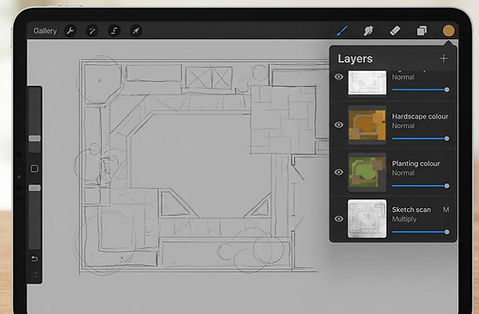
• Layer management and efficient digital workflow organisation
• Importing plans, surveys and reference imagery into Procreate
• Combining hand-drawn creativity with professional digital presentation methods

Who This Course Is For?
Landscape professionals wanting to improve visual presentation
Designers looking to modernise traditional sketching methods
Creative professionals wanting flexible iPad-based design workflows
Course Format

Training is available in flexible formats depending on your experience level and preferred learning style.
Options include:
• Online Procreate training sessions
• In-person training where available
• One-to-one tuition
• Small group workshops
• Flexible learning tailored to real garden design projects
Training can be adapted for beginners, intermediate users and experienced professionals looking to refine existing workflows.
Frequently Asked Questions
Is this Procreate course suitable for beginners?
Yes. Training is suitable for beginners transitioning from traditional drawing methods into digital garden design workflows.
What can Procreate be used for in garden design?
Procreate can be used for concept sketching, presentation layouts, annotations, digital drawing, visual communication and client presentations within garden and landscape design projects.
Is the training available online?
Yes. Online learning options are available, allowing garden designers and landscape professionals to access training remotely.
Who delivers the training?
Training is delivered by John Wood, founder of Create Visual and specialist in digital garden design workflows, visual communication and software training for garden designers and landscape professionals.
Create Visual has supported garden designers and landscape professionals across the UK with digital workflows, visual communication and software training tailored specifically to the garden design industry.
Training is delivered by John Wood — founder of Create Visual, garden design software specialist and experienced digital workflow tutor. Based on real-world experience working with garden designers, the training focuses on practical application rather than overly technical software instruction.
Courses are designed to help professionals improve efficiency, presentation quality and confidence when using digital tools within real client projects.
