


Digital vs Traditional Garden Design: What to Keep, What to Change

By John Wood TL;DR:
You don't have to choose between your sketchbook and an iPad. Most garden designers who adopt digital tools keep hand-drawing at the heart of their process — using apps like Procreate and Morpholio Trace to speed up refinements, not replace creative thinking. A hybrid workflow lets you protect the hand-drawn style clients love while gaining the precision, flexibility and presentation polish that digital tools offer. Start small — one app, one stage of your workflow — and build from there.
Do I Really Need Digital Tools as a Garden Designer?
No — you can still run a successful garden design practice using hand-drawn plans alone. But digital tools are becoming harder to ignore, and for good reason. The Landscape Institute now runs dedicated Digital Practice conferences exploring how emerging technologies are reshaping landscape workflows, from BIM to AI-assisted design. The Society of Garden and Landscape Designers (SGLD) offers CPD courses specifically on Procreate, Morpholio Trace and SketchUp for garden designers, reflecting growing professional demand.[1][2][3][4]
That doesn't mean everyone must switch. The real question isn't "digital or traditional?" — it's "where could digital tools save me time or improve my output without changing the qualities that make my work distinctive?" For many designers, the answer is a blend of both.
What Parts of Garden Design Still Work Best on Paper?
Hand-drawing remains unbeatable for early-stage creative thinking — and most digital advocates say the same thing. Sketching by hand during an initial site visit or client consultation keeps your attention on the space and the conversation, not on menus and settings. The physical act of putting pencil to paper engages a different kind of thinking: it slows you down, encourages you to consider each line and forces you to prioritise what matters in the design.[5]
Concept sketches and loose ideation work are typically faster and more expressive on paper. Tracing paper layered over a base plan — the classic garden design workflow — is still one of the most efficient ways to iterate through early layout ideas. If your hand-drawn style is part of your brand and clients specifically value it, there's no obligation to replace that with a digital equivalent.[6]
Tasks that typically stay on paper:
· First-visit site sketches and notes
· Loose concept explorations on tracing paper
· Quick client-facing doodles during face-to-face meetings
· Mood boards and collage-style inspiration gathering
Where Do Digital Tools Genuinely Improve a Garden Design Workflow?
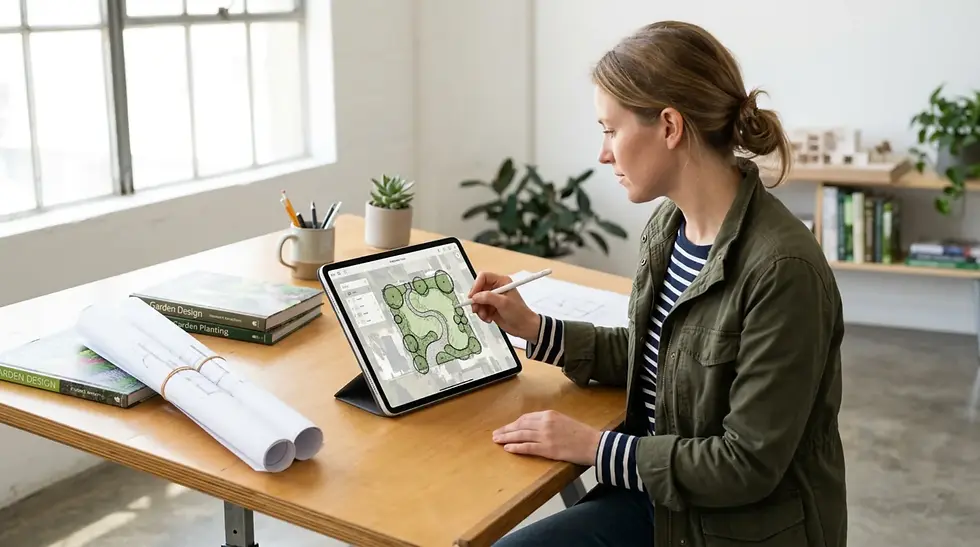
Digital tools shine where hand-drawing hits its limits: revisions, precision, layering, and presentation. The ability to make major changes without starting from scratch is one of the strongest practical arguments for going digital. Where a hand-drawn plan might require a full redraw after a client changes their mind about a terrace position, a digital file lets you move, resize and adjust elements in minutes.[7][8]
John Wood, a garden designer and CPD tutor for the Society of Garden Designers, describes Procreate as having "all of the digital capabilities of Photoshop, with the remarkable advantage of drawing directly onto the screen," noting that "the computer's ability to duplicate and manipulate imagery with such ease makes the process of producing a hand-rendered illustration incalculably faster than conventional drawing".[9]
Key areas where digital adds genuine value:
· Revisions and iterations: Move elements, test colour schemes and try alternative layouts without redrawing from scratch.[10][7]
· Planting visualisations: Draw botanical illustrations in Procreate and import them as components into SketchUp models for horticultural accuracy in 3D views.[9]
· Client presentations: Polished, layered digital drawings are easier to share remotely and present professionally, particularly for clients who expect visual clarity before committing to a build.[8]
· Area calculations: Apps like Morpholio Trace can calculate site, planting or path areas in real time as you sketch, removing the need for manual measurements after the fact.[11]
· Scale drawing on site: Morpholio Trace allows designers to draw over auto-scaled satellite maps, measure distances and assess sun orientation directly within the app.[12]
Can I Keep My Hand-Drawn Style If I Switch to Procreate?
Yes — and this is the point most anxious designers underestimate. Procreate and similar apps are specifically designed to mimic the feel of traditional media. You can sketch in pencil, draw in ink, or paint in watercolour in ways that closely replicate traditional techniques, but with the flexibility of digital layers and undo. The Apple Pencil on an iPad responds to pressure and tilt much like a real pencil or brush, so your natural drawing gestures carry over.[4]

John Wood's SGLD Procreate courses teach designers to create "photorealistic plant libraries, sketched plant libraries and texture libraries" using techniques that mirror hand-rendering — the tools change, but the artistic voice stays the same. James Akers, a UCLA professor of iPad Drawing and practising architect, describes his approach as "hybrid renderings: fast, flexible sketches that blend seamlessly with photographs, while still delivering the charm of hand drawing and the realism of digital rendering".[13][4]
The critical insight is that Procreate doesn't impose a "digital look" on your work — it amplifies whatever style you already have. If you draw loose, gestural planting plans by hand, you'll produce loose, gestural planting plans in Procreate. The difference is that you can duplicate, adjust and refine them far more quickly.
How Do Procreate and Morpholio Trace Compare for Garden Designers?
Both are popular iPad apps among garden and landscape designers, but they serve slightly different roles in a workflow.
Feature | Procreate | Morpholio Trace |
Primary strength | Freehand illustration, rendering, botanical drawing | Scaled technical drawing, site plans, diagramming |
Feel | Digital canvas — closest to a sketchbook or painting surface | Digital drawing board — closest to tracing paper and scale rule |
Scale drawing | Manual setup required (possible but not built-in) | Built-in auto-scale from maps and imported PDFs[11][12] |
Area calculations | Not available | Automatic — sketch a shape and get its area instantly[11] |
Stencils and patterns | Custom brushes available (foliage, texture packs) | Curated landscape stencils for trees, people, paving patterns[11] |
Layers | Extensive — ideal for complex illustrations[9] | Layer-based tracing paper system[14] |
Integration | Exports PNGs to SketchUp, Photoshop[9] | Imports/exports PDFs, integrates with CAD workflows[3] |
Cost | One-off purchase (approx. £13.99) | Approx. £20/year subscription[3] |
Best for | Planting plans, renders, botanical illustration, post-production | Masterplans, site surveys, concept diagrams, measured drawings |
Many designers use both. A common workflow is to develop scaled plans and site layouts in Morpholio Trace, then bring elements into Procreate for rendering, colour and illustrative detail.[14][9]

How Can I Start Using Digital Tools Without Overwhelming My Process?
The most effective approach is to introduce digital tools into one stage of your existing workflow rather than attempting a complete switch. Pro Landscaper's recent column on iPad-based workflows for landscape professionals emphasises that Morpholio Trace "preserves the familiar workflow of traditional drafting — drawing, scaling, tracing and measuring remain fundamentally manual operations, just as they would be with pencil, scale rule and tracing paper". The transition can feel almost invisible.[14]
A practical starting sequence:
1. Week 1–2: Import a hand-drawn base plan into Procreate or Morpholio Trace. Use digital layers to experiment with colour overlays or planting ideas on top of your scanned sketch — keeping the original safe underneath.
2. Week 3–4: Try using Procreate's brushes to create a small library of your most-used plant symbols. Draw them once, then duplicate and reuse across future projects.[9]
3. Month 2: Sketch a full concept plan on the iPad using your natural drawing style. Compare it with a similar hand-drawn plan — most designers find the results are closer than expected.
4. Month 3+: Begin integrating digital elements into client presentations. Use Morpholio Trace for scaled site plans and Procreate for rendered visuals where appropriate.
The SGLD's introductory Procreate course, tutored by John Wood, follows exactly this progressive approach — starting with basic sketching and plant libraries before moving into more complex visualisation techniques.[4]
What About Cost, Learning Curve and Practical Concerns?
Cost: Entry costs are modest. An iPad Air or standard iPad with Apple Pencil is sufficient — you don't need the most expensive iPad Pro. Procreate is a one-off purchase of around £13.99, and Morpholio Trace is approximately £20 per year. Compared with Vectorworks, AutoCAD or other professional CAD software, these tools are highly accessible.[3]
Learning curve: Both apps are designed to be intuitive for people who already draw. The SGLD's two-day introductory courses in Procreate and Morpholio Trace are specifically aimed at garden designers with no prior digital experience. If you can draw on paper, you can draw on an iPad — the adjustment is physical (getting used to the glass surface and Apple Pencil weight) rather than conceptual.[3][4]
Screen fatigue: Extended iPad work can cause eye strain. Many designers work in short digital sessions — doing concept thinking on paper, then switching to the iPad for refinement and presentation work. A hybrid approach naturally limits screen time.
File management and backup: Digital files need organising. Cloud storage (iCloud, Google Drive or Dropbox) ensures your work is backed up automatically — something paper-based practices can't match without scanning.
What Do Clients Actually Care About — Digital or Hand-Drawn?
Most residential clients care about understanding the design, not about how it was produced. A clear, well-presented plan will impress whether it's hand-rendered watercolour or a polished Procreate illustration. That said, digital presentations are easier to share remotely, simpler to revise on the spot, and increasingly expected for larger or commercial projects.[7][8]
Some clients actively prefer the warmth and character of hand-drawn plans — and a hybrid workflow lets you offer both. You might present early concepts as hand sketches (which feel personal and collaborative) and follow up with refined digital visuals that give confidence about the finished result. The combination signals both creativity and professionalism.
FAQs
Do I have to give up my sketchbook if I start using Procreate?
Absolutely not. Most garden designers who adopt Procreate continue to use sketchbooks for early ideation, on-site notes and loose concept work. Procreate is best introduced as a complement to your existing process — handling refinements, renders and presentation drawings — rather than a wholesale replacement for paper.[4][14]
Is digital garden design only for tech-savvy designers?
No. Apps like Procreate and Morpholio Trace are specifically designed to feel like traditional drawing tools. The Society of Garden Designers runs introductory courses aimed at designers with no prior digital experience, and most participants are already comfortable within two days of hands-on practice.[3][4]
Can I start with just an iPad and one app?
Yes — that's the recommended approach. An iPad with Apple Pencil and either Procreate (for illustration) or Morpholio Trace (for scaled plans) is enough to begin. You can add further tools as your confidence and needs grow.
What's the best way to scan or import my hand sketches into Procreate?
The simplest method is to photograph your sketch with the iPad's camera and import the image as a new layer in Procreate. For higher-quality results, use a scanning app (such as Adobe Scan or Apple's built-in document scanner) to create a clean PDF, then import that. Once inside Procreate, reduce the layer opacity and draw over it on a new layer — just as you would with tracing paper.[9]
Do clients really care whether my drawings are digital or hand-drawn?
Most clients focus on whether they can understand and feel excited by the design, not on the medium used to create it. A well-presented hand sketch can be just as persuasive as a digital render. However, digital files are easier to share, revise and archive — which adds practical value for both designer and client.[8][7]
Sources
· CADsoft Solutions — Procreate and SketchUp for Garden Designers (John Wood): https://cadsoftsolutions.co.uk/blogs/case-studies/procreate-and-sketchup-for-garden-designers
· AI Garden Planner — Digital vs Traditional Garden Design: Pros and Cons: https://aigardenplanner.com/blog/post/digital-vs-traditional-garden-design-pros-and-cons
· School of Permaculture — Pros and Cons of Hand Drawings and Computer Graphic Design: https://schoolofpermaculture.com/permaculture-tip-day-hand-drawings-and-computer-designs/
· Landscaping Dundalk — Digital vs Traditional Garden Planning Methods: https://landscapingdundalk.com/blog/digital-vs-traditional-garden-planning-methods/
· Reddit /r/LandscapeArchitecture — Transitioning from Traditional to Digital Workflow: https://www.reddit.com/r/LandscapeArchitecture/comments/pyxv6l/
· Landscape Institute — Digital Practice & Technology for Landscape Conference: https://landscapeinstitute.org/news/digital-practice-technology-for-landscape/
· Landscape Institute — Digital Conference Programme: https://landscapeinstitute.org/landscape-institute-digital-conference/
· Society of Garden Designers — Introduction to Morpholio Trace with John Wood: https://sgld.org.uk/events/calendar/658/
· Society of Garden Designers — Introduction to Procreate with John Wood: https://sgld.org.uk/events/calendar/1880/
· Morpholio — Landscape Design Drawing Toolkit: https://morpholioapps.com/content/trace-landscape-en/
· Create Visual — Enhancing Garden Design with Freehand Drawing on Morpholio Trace: https://www.create-visual.co.uk/post/enhancing-garden-design-with-freehand-drawing-techniques-on-morpholio-trace
· Pro Landscaper — How iPad-based Workflows Can Help Landscape Professionals (John Wood): https://www.prolandscapermagazine.com/2025/09/25/how-ipad-based-workflows-can-help-landscape-professionals/
· Pro Landscaper — Preparing Digital Site Surveys in Morpholio: https://www.prolandscapermagazine.com/2025/10/21/preparing-digital-site-surveys-in-morpholio/
· iPad for Architects — Procreate + SketchUp Design Workflow (James Akers): https://www.youtube.com/watch?v=PPC75kfjOJU
· Jonathan Pickup — Using Procreate for Early Landscape Design: https://www.youtube.com/watch?v=DHs2l5AKEQ4
References
1. Landscape Institute Digital Conference - How information management and data efficiency shapes business operations and project delivery, faci...
2. Digital Practice & Technology for Landscape - The Digital Practice and Technology for Landscape conference is for professionals, researchers and s...
3. SGLD CPD Digital: An Introduction to Morpholio Trace with John Wood - This course will cover all the essentials for working with this game-changing technology, from freeh...
4. An Introduction to Procreate with John Wood - 13 & 14 November ... - This course is designed to unlock your creative potential as a designer by introducing you to Procre...
5. Pros and Cons of Hand Drawings and Computer Graphic ... - Hand rendering offers the flexibility of thinking in strategy and time because your senses (hands an...
7. Digital vs Traditional Garden Design: Pros and Cons - Explore the advantages and challenges of digital and manual garden design methods to find the best a...
8. Digital vs Traditional Garden Planning Methods: Finding the Right ... - When to use computer software, when to stick with pencil and paper, and why the best approach often ...
9. Procreate and SketchUp for Garden Designers - Procreate works in numerous ways to support our work as garden designers. A single click transforms ...
10. Complete Guide to Garden Design Software: Digital Tools for ... - Explore the best garden design software available today, from free tools to professional platforms, ...
11. Calling All Landscape Designers! - Morpholio - 01. Landscape Color Palettes. From diagrams to garden plans to renderings, pick the perfect landscap...
12. Preparing digital site surveys in Morpholio - Pro Landscaper UK - Welcome to this regular column, where John Wood shares practical, iPad-based digital workflows, tool...
13. The Secret iPad Drawing Shortcut Your Competitors Will Envy - Want to cut your design and presentation time from days to just hours? In this video I reveal the se...
14. How iPad-based workflows can help landscape ... - A new monthly column in Pro Landscaper with John Wood explores iPad-based workflows for landscape pr...
Author Bio
Written by John Wood. John is a specialist in digital garden design software and the founder of Create Visual. He trains garden and landscape designers in Procreate, SketchUp, Morpholio Trace and AI design tools
#gardendesign #gardendesigner #landscapedesign #landscapedesigner #procreateart #procreateillustration #gardenplanning #plantingdesign #hybridworkflow #digitalsketchbook #morpholiotrace #iPaddesign #gardendesignUK #landscapearchitecture #designworkflow #handdrawndesign #digitaltools #SGLD #gardendesigntips #plantingplan

Comments